
Getting an ALTA Title Survey right in Denver takes more than just measuring and mapping the land. Because Denver sits more than 5,000 feet above sea level, small errors in distance can cause big problems later. One of the most common mistakes happens when surveyors forget to adjust for the difference between grid distance and ground distance.
That’s where the Combined Scale Factor (CSF) comes in. It helps surveyors make sure that every measurement in Civil 3D matches what’s actually on the ground.
Why Accuracy Matters in an ALTA Title Survey
When you draw a property in Civil 3D, you’re working on a “flat map” called a grid. But the real world isn’t flat—it’s curved, uneven, and full of elevation changes. That difference means a line that measures 1,000 feet on the computer might not be 1,000 feet on the actual site.
In most cities, that difference might be tiny. But in Denver, where the elevation is high, the change between grid and ground can be enough to cause issues. If a survey doesn’t match ground conditions, it can lead to:
- Errors in boundary lines and easements
- Delays in title approval
- Problems with construction plans or permits
For surveyors, using the right Combined Scale Factor isn’t optional—it’s part of doing the job right. And for clients, it means a survey that’s reliable, accurate, and accepted by lenders, title companies, and the city.
What the Combined Scale Factor Really Means
The Combined Scale Factor (CSF) is a number surveyors use to fix grid distances so they show true ground measurements. It’s made up of two parts:
- Projection Scale Factor – adjusts for the map’s curve when it’s flattened into a grid.
- Elevation Factor – adjusts for how high your project sits above sea level.
When you multiply these two together, you get the CSF, which corrects your map distances to match the real world.
Here’s a simple example: If a site’s average elevation is around 5,400 feet, the CSF might come out to about 0.99987. That means every “grid foot” on your drawing is slightly smaller than a real foot on the ground. Applying the CSF makes sure all distances are true ground lengths.
Choosing the Right Coordinate System
Every area has its own coordinate system to help surveyors stay consistent. Denver uses the Colorado Central State Plane Coordinate System, also called NAD83(2011) / Colorado Central (ftUS).
This system keeps everyone—surveyors, engineers, and city reviewers—working from the same base map. Using the right coordinate system is one of the first steps in making sure your ALTA Title Survey lines up correctly with other documents.
Before you start your project in Civil 3D:
- Set your coordinate system to Colorado Central Foot.
- Make sure your units are in the U.S. Survey Feet, not meters.
- Confirm that your control points use the same system and datum.
These small setup steps prevent problems later when your survey is checked or compared with other drawings.
Standards That Keep Everyone Aligned
In Denver, local agencies have clear expectations for land survey accuracy. They require that each survey uses the proper coordinate system, verified benchmarks, and consistent reporting.
Following these standards helps make sure your work meets review requirements. It also saves time by preventing rejections or revisions when you submit your survey for approval.
Using Control Points and Benchmarks
Denver provides access to an online map of Range Points and Benchmarks that show exact positions and elevations. These control points are verified by the city and serve as the base for consistent mapping.
Here’s how surveyors use them:
- Find the closest monuments near your project.
- Use at least one as your basis of bearings.
- Add that monument’s name, coordinates, and elevation to your plat’s title sheet.
This simple step ties your ALTA Title Survey to the local control system, which keeps all mapping consistent across the city.
How to Compute and Apply the CSF in Civil 3D
Now let’s get practical. Here’s how surveyors compute and apply the Combined Scale Factor when working on an ALTA Title Survey in Civil 3D:
- Find Your Average Project Elevation: Use your topographic data or GPS points to get the mean elevation of your site.
- Compute the Elevation Factor: Use this formula:
Elevation Factor=Earth’s RadiusEarth’s Radius+Elevation\text{Elevation Factor} = \frac{\text{Earth’s Radius}}{\text{Earth’s Radius} + \text{Elevation}}Elevation Factor=Earth’s Radius+ElevationEarth’s Radius
This step accounts for Denver’s altitude. - Get the Projection Scale Factor: Civil 3D can calculate this automatically once you set the right coordinate system.
- Multiply the Two Values: Multiply the projection and elevation factors to get your Combined Scale Factor.
- Enter the CSF in Civil 3D: In your drawing settings, create a user-defined coordinate system and enter the CSF under the grid-to-ground settings.
- Test the Results: Measure a few known distances in the field and compare them with your drawing. If they match, your setup is correct.
Once confirmed, save your configuration in your company template so you don’t have to redo it for every Denver project.
Avoiding Common Mistakes
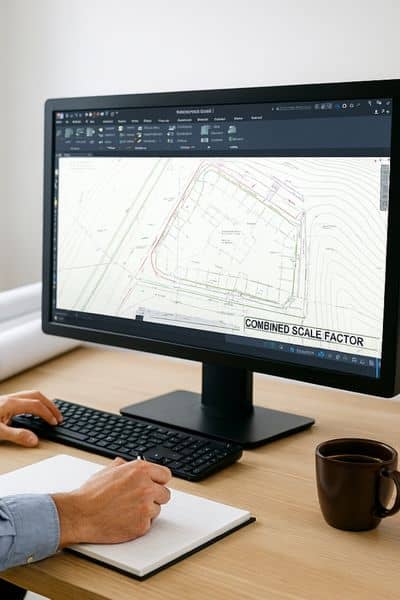
A few simple oversights can cause big headaches:
- Using the wrong projection zone.
- Forgetting to change from meters to U.S. Survey Feet.
- Leaving out the CSF and labeling grid distances as ground distances.
- Skipping the note on your plat that explains which CSF was used.
Always include a short note on the drawing, such as:
“Distances shown are ground distances based on a combined scale factor of 0.99987.”
That one line helps reviewers, engineers, and clients understand exactly what you did.
Why This Process Benefits Clients
While all this might sound technical, it has real-world benefits for property owners, lenders, and developers. When the surveyor applies the correct Combined Scale Factor, everything lines up—from property lines to improvements to easements.
That accuracy prevents title problems, keeps loan closings smooth, and gives developers confidence when planning construction. In other words, a properly adjusted ALTA Title Survey doesn’t just meet local standards—it protects your investment.
The Takeaway
Denver’s high elevation makes accuracy more than a technical detail—it’s a necessity. Using the right coordinate system and applying the Combined Scale Factor in Civil 3D keeps every ALTA Title Survey aligned with both the ground and mapping standards.
For surveyors, this workflow ensures consistent, trusted results. For clients, it means fewer surprises, faster approvals, and a clear understanding of what they own.
If you need an ALTA Title Survey that meets professional standards, work with licensed surveyors who know how to get the math—and the details—right the first time.